What Is App Store Optimization? Your 2026 ASO Guide
Our 2026 guide explains what is app store optimization from basics to a starter workflow, covering creatives, keywords, and measurement.
On this page
- What Is App Store Optimization Really
- Why ASO Is Your Most Important Marketing Channel
- Search intent changes the economics
- ASO also shapes credibility
- The Four Pillars of Modern App Store Optimization
- Keywords tell the store what you are
- Creatives tell people why they should care
- Ratings and reviews reduce doubt
- Technical performance protects the promise
- App Store vs Google Play ASO A Tale of Two Stores
- The practical difference
- ASO Comparison Apple App Store vs Google Play Store
- Your First ASO Workflow Research Implement and Test
- Start with search language not brand language
- Turn research into a live listing
- Test one clear hypothesis at a time
- Measuring ASO Success and Essential Tooling
- Measure the part of the funnel you translated
- Metrics that map to the job ASO is doing
- Tools should fit the workflow, not run it
- Conclusion ASO Is a Conversation Not a Monologue
You've shipped the app. The onboarding is clean, the core loop works, and early users say the product is useful. Then you hit the part many founders underestimate: the store listing.
That's where strangers decide whether your app is relevant, trustworthy, and worth the tap. They don't see your roadmap, your architecture, or how hard your team worked. They see a title, an icon, a few screenshots, a rating, and maybe a preview video. In a few seconds, they make a decision.
That's why app store optimization matters. If product development is building value, ASO is translating that value into the language of the app stores so both algorithms and humans can understand it.
What Is App Store Optimization Really#
A useful way to think about what is app store optimization is this: it sits halfway between SEO and retail packaging.
SEO helps people find a result. Packaging helps them choose it. ASO does both inside the App Store and Google Play. It helps your app appear when someone searches for a problem, and it helps your listing convince them your app is the right answer.
Take a simple example. You built a habit tracker for developers. Internally, your team might describe it as “a streak-based behavioral consistency platform.” No user searches for that. They search for “habit tracker,” “daily routine,” or “productivity app.” ASO forces you to stop speaking in product-team language and start speaking in user language.
Then comes the second translation. Once someone lands on the page, your screenshots and copy need to answer basic questions fast.
- What does this app do
- Who is it for
- Why is it better than the alternatives
- Can I trust it enough to install
ASO is the bridge between a working product and a listing that strangers can understand in seconds.
That's where many founders get confused. They treat ASO as a metadata task. Add keywords, fill in fields, move on. But the listing is really a compact sales surface. Your title tells the store what you are. Your screenshots tell the user why it matters. Your reviews tell them whether your promise feels believable.
So the short definition is simple. App store optimization is the ongoing process of improving how easily people discover your app and how often they install it once they see it.
The practical definition is better. ASO is how you turn product value into search language, visual proof, and trust signals that fit the rules of each store.
Why ASO Is Your Most Important Marketing Channel#
If you're deciding where to focus first, ASO deserves a bigger share of attention than it typically receives.
A widely cited Apple statistic says 65% of App Store downloads follow a keyword search, which is why ASO became a formal growth discipline in the first place, as noted in AppTweak's explanation of why ASO matters. That tells you something important about intent. A large share of users aren't casually browsing. They're trying to solve a problem.
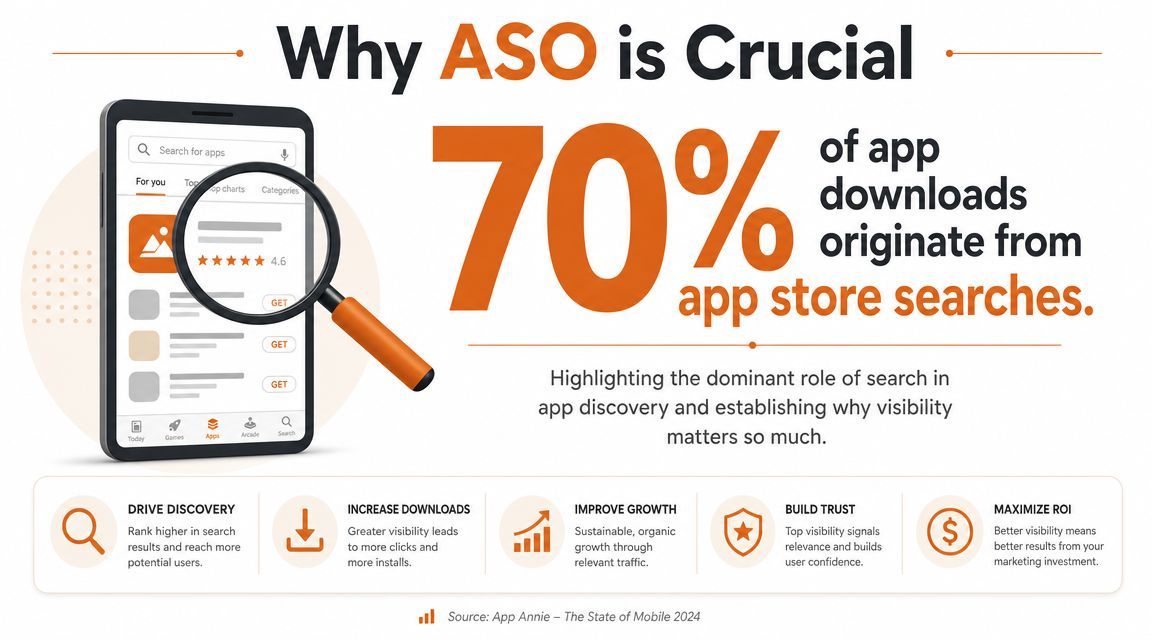
When discovery starts with search, ASO becomes more than a listing polish task. It becomes a demand-capture system. Someone already wants something. Your job is to show up with the clearest match.
Search intent changes the economics#
Paid acquisition can create attention. ASO captures attention that already exists.
That matters for founders because organic discovery usually has better strategic properties than rented traffic. A well-positioned listing can keep generating installs after launch week. It can also make your paid traffic work harder, because users clicking an ad still land on a store page that needs to convert.
A mismatch here is common. The ad promises “AI calorie tracking for busy parents.” The store page says “smart nutrition platform.” Same product, weaker translation. The campaign doesn't fail because the app is bad. It fails because the message changes at the moment of decision.
ASO also shapes credibility#
Users make trust judgments fast. A clear title, coherent screenshots, recent updates, and healthy review sentiment don't just support conversion. They make a small app look serious.
For indie teams, that's especially useful. You probably can't outspend larger competitors, but you can be sharper. You can describe the job your app does in simpler language. You can make the first two screenshots answer the exact use case someone searched for. You can remove friction from the install decision.
Practical rule: If a user can't tell what your app does from the first screenful of the listing, your ASO isn't finished.
The deeper reason ASO matters is that every other channel tends to feed into it. Ads send users there. Word of mouth sends users there. Press sends users there. Even a direct recommendation from a friend often ends with someone checking the listing before installing.
That makes ASO a shared conversion layer for the rest of your growth system. If that layer is weak, every acquisition effort leaks.
The Four Pillars of Modern App Store Optimization#
Modern ASO isn't one checklist. It's a set of connected levers that work together. If you only optimize keywords, you may get impressions but lose installs. If you only improve visuals, you may have a convincing page that too few people ever see.
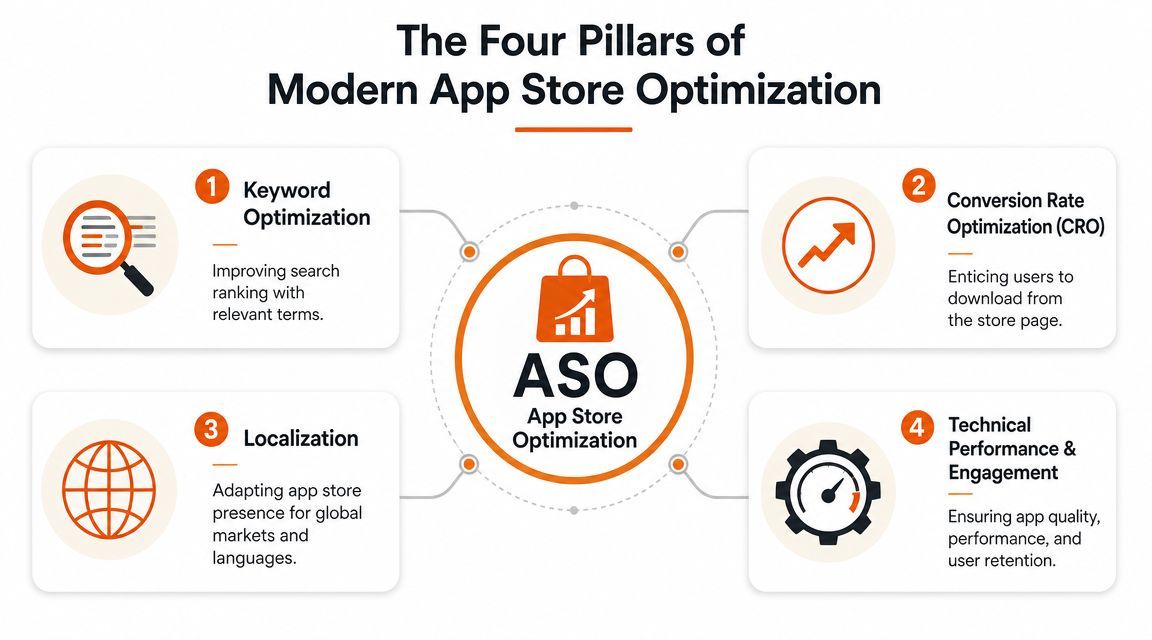
One reason ASO evolved is that it expanded beyond simple keyword placement. Apple's App Store keyword field is limited to 100 characters, which forces prioritization, and current practice now includes visual conversion work, review management, and regular updates, as described in Semrush's ASO guide.
A good mental model is four pillars.
Keywords tell the store what you are#
This is the discoverability layer. You're choosing the phrases that best represent the app's job, then placing them where each store expects them.
The mistake beginners make is trying to rank for everything. Broad, crowded terms often sound attractive but say too little. A sleep app that targets only “health” tells the store almost nothing. “Sleep sounds,” “white noise,” or “bedtime tracker” are much closer to actual intent.
A practical starting point is to narrow to a small set of main themes. If you need help structuring that work, this guide to app store keyword research is a useful companion.
Creatives tell people why they should care#
Once the listing appears, your icon, screenshots, and preview video take over.
Many ASO guides stop too early. They talk about ranking as if visibility is the whole game. It isn't. Store-page assets are your proof layer. They should show the product, frame the use case, and make the benefit concrete.
A budgeting app screenshot that says “Manage Your Money” is vague. A screenshot that says “Track bills and subscriptions in one place” is much stronger because it describes a job the app performs.
Here's a useful explainer before you watch the video below: notice how strong ASO examples don't just decorate the UI. They stage the UI around a promise the user already cares about.
Ratings and reviews reduce doubt#
Keywords can earn the tap. Reviews help close the decision.
People scan for friction. If they see repeated complaints about bugs, billing confusion, or poor onboarding, your polished screenshots won't rescue the listing. On the other hand, thoughtful responses and improving sentiment create reassurance that the team is active and the app is alive.
This pillar is partly operational. Product quality and support quality show up here. ASO and product can't be separated for long.
Reviews are user research in public. Treat them that way.
Technical performance protects the promise#
The listing makes a promise. The app has to keep it.
If your page sells speed, simplicity, or reliability, but the first session feels clunky, retention and sentiment will suffer. That eventually feeds back into store performance. This is why strong ASO programs stay close to product analytics and release quality.
Localization belongs naturally inside this broader modern view too. Different markets and store environments behave differently, so ASO now works better as an ongoing set of experiments across platforms, locales, and storefront elements rather than a one-time metadata pass. This is the fundamental shift: ASO has grown from “fill in fields” to “translate product value for each context.”
App Store vs Google Play ASO A Tale of Two Stores#
A common beginner mistake is copying the same listing logic into both stores.
That usually creates mediocre results on both sides because the App Store and Google Play don't interpret listings the same way. Industry guidance increasingly points to separate testing by locale and platform because iOS and Google Play behave differently and shouldn't be optimized with a one-size-fits-all approach, as summarized in Wikipedia's overview of app store optimization.
The practical difference#
On Apple's App Store, metadata choices are tightly constrained. That forces sharper prioritization. On Google Play, the listing gives you different opportunities, especially in how written content can support discoverability.
This changes how you write and test.
For iOS, you should think in terms of keyword precision and clean field usage. For Google Play, you still need precision, but you also need a more complete page that reads naturally while reinforcing relevance. If you treat Google Play like an Apple listing with longer text, you'll miss useful surface area. If you treat Apple like Google Play with extra fields, you'll waste precious space.
ASO Comparison Apple App Store vs Google Play Store#
| Factor | Apple App Store (iOS) | Google Play Store (Android) |
|---|---|---|
| Metadata strategy | More constrained, with dedicated keyword logic in metadata | Broader listing text plays a larger role in how the store understands the app |
| Creative emphasis | Screenshots, icon, and preview assets strongly shape conversion | Screenshots, icon, video, and listing copy work together on conversion |
| Testing approach | Best treated as tightly scoped experiments by asset and search intent | Best treated as listing-level experiments that combine text and creative learning |
| Localization workflow | Locale choices require deliberate keyword and creative planning | Language and market adaptation should align with Play-specific listing behavior |
| Operational mindset | Precision and prioritization | Breadth with relevance |
A helpful way to explain this to a technical founder is to compare the stores to two different APIs. They may expose similar outputs, installs and rankings, but the inputs aren't identical. You can't assume one request schema works for both.
That also affects creative choices. On one store, a screenshot set might be carrying more of the persuasion load. On the other, the text around that set might contribute more to how the page is understood. The implication is simple: build separate hypotheses per store.
- For iOS: Ask whether your title, subtitle, keywords, and first screenshots align around one clear search intent.
- For Android: Ask whether your full listing presents the use case naturally and consistently, not just whether the headline fields are strong.
- For both: Keep the promise stable. If your product message changes by store, users notice the inconsistency.
Teams often want a universal ASO template because it feels efficient. In practice, that shortcut usually creates fuzzy positioning. Better to keep one product narrative and express it differently based on each store's rules.
Your First ASO Workflow Research Implement and Test#
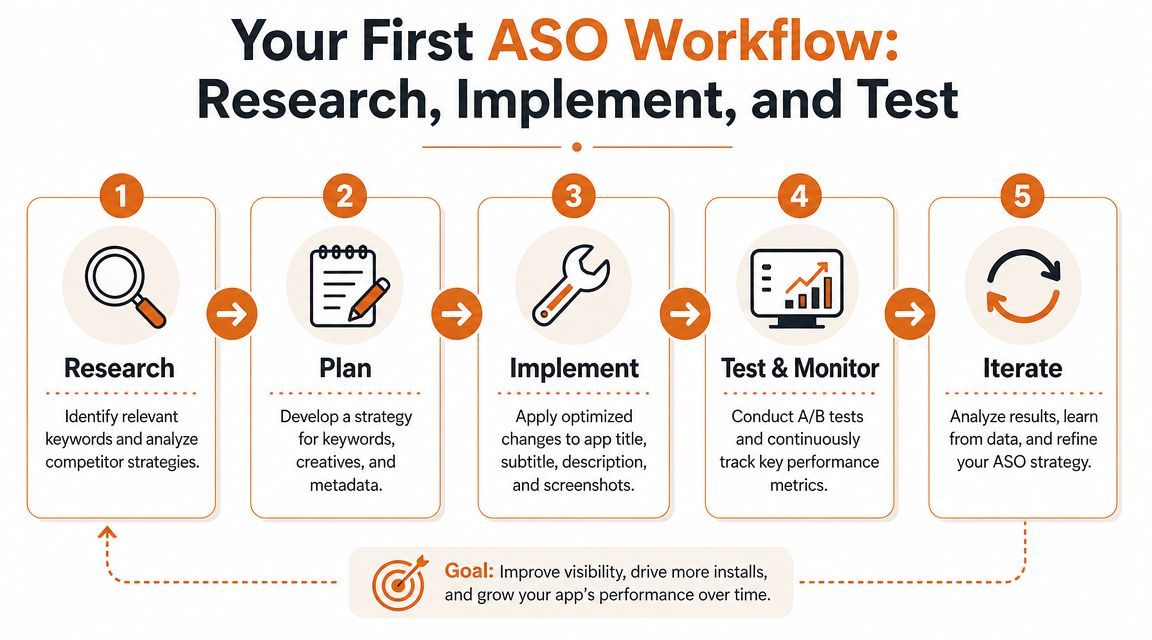
The easiest way to get stuck with ASO is to think you need a perfect launch listing. You don't. You need a disciplined first version, a clean measurement plan, and a habit of testing.
Start with search language not brand language#
Let's use a hypothetical app: a running coach that creates simple training plans for beginners.
Your team might describe it as “adaptive endurance programming.” The store user probably searches for “running plan,” “5k training,” “run tracker,” or “beginner running.” Start there.
Build an initial keyword set from four places:
- Core use cases
Write down the plain-language jobs the app does. “Train for a 5k” is better than “personalized fitness.” - Competitor listings
Look at the titles, subtitles, and screenshot headlines of direct competitors. You're not copying them. You're learning what language the category already uses. - User phrasing
Pull wording from reviews, support tickets, community posts, or founder interviews if you have them. Users often describe the product more clearly than the team does. - Store constraints
Narrow your list to the terms you can execute well. Broad lists feel productive, but focused lists are easier to write around.
Turn research into a live listing#
Now convert that language into a coherent page.
For metadata, choose a primary use case and support it with adjacent terms. For screenshots, map each frame to a question a user has before install.
- Screenshot 1: What is this app?
- Screenshot 2: What outcome do I get?
- Screenshot 3: How does it work?
- Screenshot 4: Why should I trust it?
- Screenshot 5 and beyond: Which features matter most to this audience?
If you're building your first process, a practical checklist like this app store optimization checklist can help you avoid missing obvious details.
Apple's own tooling reinforces that visual testing is part of ASO, not a design afterthought. Product Page Optimization exists specifically for testing alternate icons, screenshots, and preview videos to improve engagement, which you can see in Apple's Product Page Optimization documentation.
Don't ask each screenshot to explain a feature. Ask each screenshot to remove one install objection.
Test one clear hypothesis at a time#
After launch, resist the urge to change everything.
If you rewrite the title, replace the icon, reorder screenshots, and update copy at once, you won't know what moved the result. Better hypotheses sound like this:
- Keyword hypothesis: “Users search for a planning outcome, not a generic fitness term.”
- Creative hypothesis: “A first screenshot focused on beginner success will convert better than a feature collage.”
- Message-match hypothesis: “The same promise used in paid campaigns should appear in screenshot headlines.”
A simple first-cycle workflow looks like this:
| Step | What you do | Why it matters |
|---|---|---|
| Research | Identify user language, category patterns, and likely search intent | Prevents internal jargon from shaping the listing |
| Plan | Pick a small set of themes and a screenshot narrative | Keeps the page coherent |
| Implement | Update metadata and assets to express one clear promise | Gives the store and the user the same story |
| Monitor | Watch source-specific movement after the change | Helps you separate signal from noise |
| Iterate | Keep what improved, replace what didn't | Turns ASO into a repeatable system |
That's the point where ASO becomes manageable. Not easy, but manageable. You're no longer guessing. You're translating, shipping, observing, and refining.
Measuring ASO Success and Essential Tooling#
A founder updates the title, rewrites the first screenshot, and sees installs rise a week later. Good news, but still a fuzzy answer. ASO works best when you measure the part of the store conversation you changed.
Expert guidance from OneSignal's ASO guide recommends watching organic downloads and conversion rate, then breaking performance out by store surface. On iOS in particular, search and browse can behave differently because users arrive with different intent, and different listing elements shape what happens next.
Measure the part of the funnel you translated#
ASO is the work of expressing product value in store language. That means your measurement should match the layer of language you edited.
If you changed keyword-bearing metadata, check whether search visibility and search-sourced performance moved. If you changed screenshots, icon, or video, watch the conversion behavior on the surfaces where those assets carry more weight. If you improved review quality or replied to user complaints, look for changes in rating health, sentiment, and downstream conversion. If you localized, compare each market on its own terms instead of blending all countries into one average.
A simple question keeps teams honest: what user behavior should this change influence?
That question matters because a blended install chart hides cause and effect. Search traffic can improve while browse conversion falls. A stronger screenshot set can lift first-time visitors while keyword reach stays flat. If you mix everything together, you lose the signal.
Metrics that map to the job ASO is doing#
A useful way to read ASO performance is to separate discoverability from persuasion.
| ASO job | What to watch |
|---|---|
| Discoverability | Keyword rankings, search impressions, search-sourced downloads |
| Persuasion | Conversion rate, install rate by source, first-impression asset performance |
| Trust | Ratings, review themes, signs of quality concerns that can suppress installs |
| Localization fit | Market-level conversion and visibility, not global averages |
That split helps founders avoid a common mistake. They improve ranking, then assume the listing is healthy. Ranking only gets you invited into the room. Screenshots, copy, icon, ratings, and message clarity decide whether the user says yes.
Tools should fit the workflow, not run it#
You do not need a large stack. You need tools that support the same workflow you already built: research, implementation, measurement, and iteration.
| Tool category | What it helps with |
|---|---|
| Keyword research tools | Finding search terms, competitor patterns, and shifts in user language |
| Store analytics | Tracking rankings, source-level downloads, and conversion movement |
| Experiment tools | Testing listing variants where the platform supports experiments |
| Creative production tools | Producing screenshots, headlines, and localized asset sets efficiently |
If you want a broader market view, this roundup of best app store optimization tools compares the main software categories and options.
AppGrowKit is one example in the creative production category. It helps teams create App Store and Google Play assets from real app UI, with screenshot headlines and localized variations. That makes it useful for the conversion side of ASO, especially when a team needs to test different value narratives without building every asset by hand.
Tools can speed up research and production. They cannot decide what promise your product should make in the store. That part still requires judgment. You are translating value, not filling out a checklist.
Conclusion ASO Is a Conversation Not a Monologue#
The simplest answer to what is app store optimization is that it helps people find your app and decide to install it.
The more useful answer is that ASO is a translation process. You take what the product does, express it in the language users search for, show that value visually on the store page, and refine the message based on how people respond.
That's why ASO can't be treated like launch paperwork. Stores change. Competitors reposition. User language shifts. Your own app evolves. A listing that worked six months ago may no longer be the clearest version of the product.
The teams that get the most from ASO don't treat it as a monologue where they publish one page and hope. They treat it as an ongoing conversation between product, market, and store mechanics. They listen to search behavior, conversion behavior, reviews, and performance signals. Then they adjust.
That makes ASO approachable. You don't need a massive budget to begin. You need a clear promise, a disciplined workflow, and the willingness to keep learning from the listing like it's part of the product.
If you need help on the creative side of ASO, AppGrowKit is built for making authentic App Store and Google Play assets from real product UI, with screenshot narratives and localization workflows that fit how modern listings convert.
Stop reading. Start ranking.
AppGrowKit takes everything in this article and runs it for you: keyword research, live ranks, conversion-focused screenshots, and market intel. Free to start.